So you’ve heard people talking about IPTV and you’re wondering — what is it, does it actually work, and how do I get it set up?
I get asked this all the time. People are fed up paying £60–£100 a month for a cable or satellite package that’s mostly channels they never watch. IPTV is what most of them switch to — and once they do, they don’t go back.
My name’s Kevin, and I run Kevin IPTV. I’ve helped hundreds of people get set up, from complete beginners to people who just want more channels for less money. This guide covers everything — what IPTV is, what devices it works on, how to pick the right plan, how to set it up step by step, and what to do if something goes wrong.
Read through it and you’ll know exactly what you’re doing.
What Is IPTV and How Does It Work?
IPTV stands for Internet Protocol Television. Instead of getting your TV through a satellite dish or a cable in the wall, IPTV delivers channels directly over your internet connection.
Think of it like Netflix — but instead of just on-demand shows, you also get thousands of live TV channels streaming in real time, plus a huge library of movies and series to watch whenever you like.
Here’s how it works in plain English:
- 📡 A provider like Kevin IPTV hosts thousands of channels on powerful servers
- 🔐 When you subscribe, you receive login details — a username, password, and a server URL
- 📺 You enter those details into an IPTV app on your device
- ▶️ The app connects to the server and streams channels directly to your screen
No dish. No engineer visit. No 18-month contract. Just your existing internet connection and a compatible device.
What Do You Need Before You Start?
1. A Decent Internet Connection
IPTV streams over your internet, so your connection speed matters. Here’s a rough guide to what you need:
- 📶 SD quality: 5 Mbps minimum
- 📶 HD quality: 10–15 Mbps
- 📶 Full HD / 4K: 25 Mbps or more
Most UK and Irish broadband connections in 2025 are well above this. If you’re on fibre, you’ll have zero issues. If you’re on a slower rural connection, SD and HD will still work fine.
Quick tip: A wired ethernet cable is always more stable than Wi-Fi. If your device has an ethernet port, use it — it makes a real difference.
2. A Compatible Device
Kevin IPTV works on pretty much everything already in your home:
- 📺 Android TV boxes and Android smart TVs
- 🔌 Amazon Fire Stick and Fire TV
- 📦 Mag boxes
- 📺 Samsung, LG, Sony, and Hisense smart TVs
- 💻 Windows and Mac computers
- 📱 iPhones and Android smartphones/tablets
Not sure if your device is on the list? Send me a message and I’ll check for you before you buy.
3. An IPTV Subscription
You need an active subscription to access the channels. Your subscription gives you a username, password, and server URL — these go into your IPTV app and connect you to everything.
Kevin IPTV plans start from $20. More on that below.
Kevin IPTV Subscription Plans — Which One Is Right for You?
I’ve kept the pricing simple and fair. No hidden fees, no auto-renewals you didn’t ask for.
📦 Kevin IPTV — Current Plans
- 🗓️ 1 Month Access — $20.00 — Perfect if you want to try it out properly
- 🗓️ 3 Months Access — $25.00 — Good short-term option, great value
- 🗓️ 6 Months Access — $40.00 — One of the most popular choices
- ⭐ 1 Year Subscription — $60.00 — Best value for everyday users (~$5/month)
- 🔥 3 Years Subscription — $150.00 — Long-term with serious savings
- ♾️ Lifetime IPTV — $300.00 — Pay once, never pay again
Not ready to commit? Try a free trial first — no payment needed to test the service on your device.
My honest suggestion: if it’s your first time with IPTV, grab the 1-month plan and test it on your setup. If it works well — and it should — move up to the yearly plan. At $5 a month for thousands of channels, it’s genuinely hard to argue with.
👉 Choose Your Plan and Order Now
What Channels Do You Get with Kevin IPTV?
Kevin IPTV gives you thousands of live TV channels plus a massive on-demand video library. Here’s a look at what the service actually looks like on your screen:
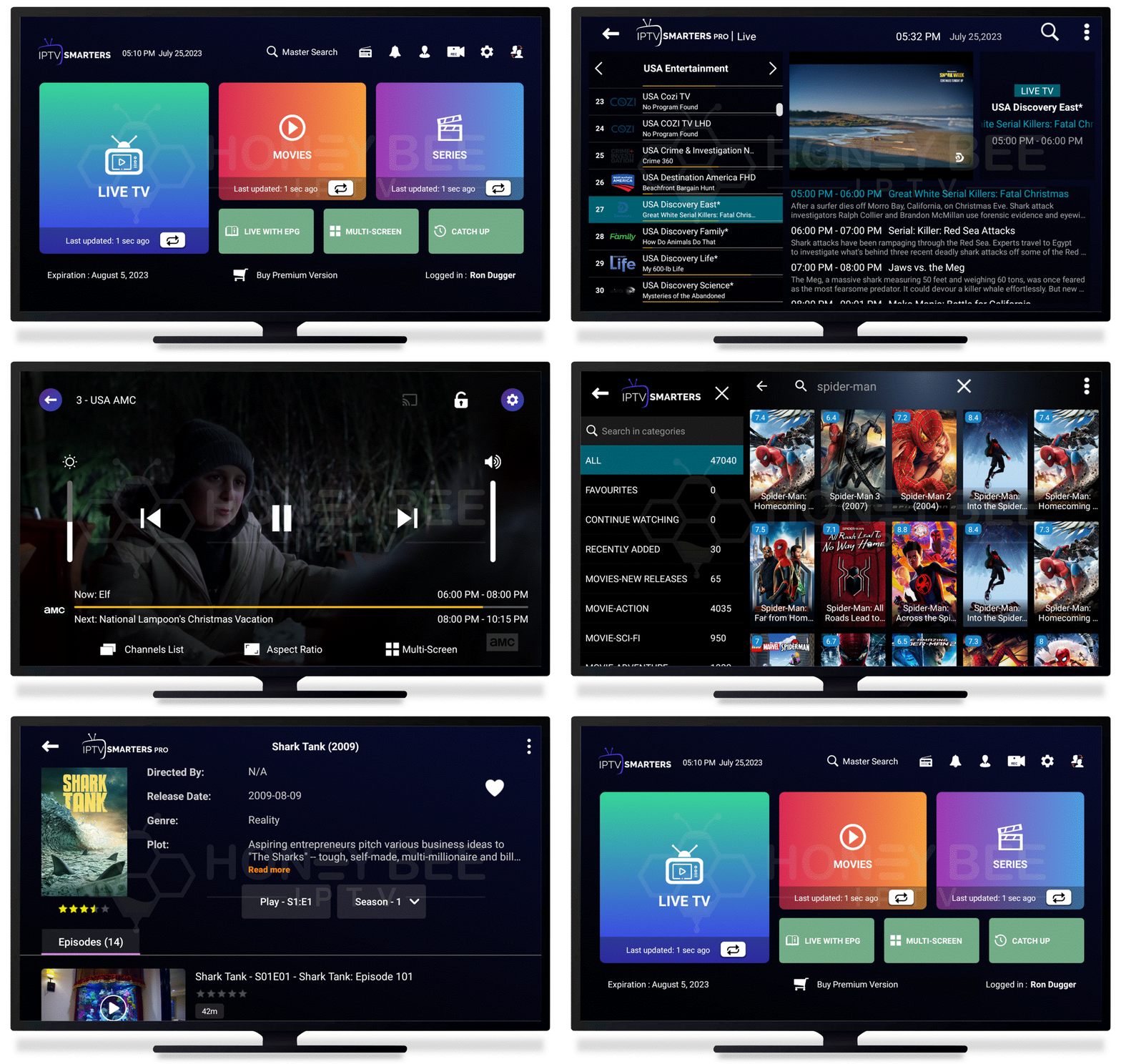
This is what Kevin IPTV looks like on your TV — clean, easy to navigate, and loaded with content
The channel lineup includes:
- 📺 UK and Irish TV channels
- 🇺🇸 US channels and networks
- 🌍 European channels (French, German, Spanish, Italian and more)
- 🌙 Arabic channels
- 🌏 Asian channels
- ⚽ Sports channels (live events and replays)
- 🎬 Movie channels and a full VOD library
- 👶 Kids channels
- 📰 24-hour news channels
- 🎭 Entertainment, reality, documentary channels
Want to check the full list before buying? Browse the complete international channel list here.
Step-by-Step Setup Guide — Every Device Covered
Once you’ve ordered and received your activation email, here’s how to get set up. I’ve covered every major device below.
🔌 Setting Up IPTV on Amazon Fire Stick
The Fire Stick is the most popular device for IPTV — cheap, simple, and it works brilliantly.
- On your Fire Stick, go to Settings → My Fire TV → Developer Options
- Turn on Apps from Unknown Sources
- Go back to the home screen and open the Downloader app (free on the Amazon store)
- Type in the app URL I send with your order — it will download and install automatically
- Open the app and enter your username, password, and server URL from your Kevin IPTV email
- Tap connect — your channels will load within a few seconds
📺 Setting Up IPTV on an Android TV Box
Android TV boxes give you the most flexibility — apps install directly from the Google Play Store.
- Open the Google Play Store on your Android box
- Search for IPTV Smarters Pro or TiviMate and install one
- Open the app → select Add Playlist via Xtream Codes
- Enter your username, password, and server URL from your activation email
- The app loads your full channel list — usually takes about 30–60 seconds the first time
📦 Setting Up IPTV on a Mag Box
- On your Mag box, go to Settings → Servers → Portals
- Enter the portal URL included in your Kevin IPTV activation email
- Save the settings and restart your box
- Your channels will load automatically when the box reboots
📺 Setting Up IPTV on Samsung or LG Smart TV
- Samsung TVs: Download the Smart IPTV app from the Samsung app store, then enter your M3U URL
- LG TVs: Download the SS IPTV app from the LG Content Store
- Easiest option for any smart TV: Plug a Fire Stick or Android box into your HDMI port — this takes 10 minutes and works on any TV made in the last 15 years
💻 Setting Up IPTV on Windows or Mac
- Download VLC Media Player for free at videolan.org
- Open VLC and go to Media → Open Network Stream
- Paste your M3U playlist URL from your Kevin IPTV email
- Click Play — channels appear in VLC’s playlist on the left
Alternatively, download IPTV Smarters from the Microsoft Store for a much cleaner interface designed specifically for IPTV.
📱 Setting Up IPTV on iPhone or Android Phone
- iPhone users: Download GSE Smart IPTV or IPTV Smarters from the App Store
- Android users: Download IPTV Smarters Pro from the Google Play Store
- Open the app → Add a new playlist using Xtream Codes login
- Enter your username, password, and server URL
- Done — you can now watch live TV anywhere you have a data or Wi-Fi connection
The Best IPTV Apps to Use in 2025
The app you use makes a big difference to how enjoyable the experience is. Here are the ones I recommend most:
- ⭐ TiviMate — The best IPTV app for Android TV boxes and Fire Sticks. Clean design, smooth EPG TV guide, great for daily use. The paid version (about $5/year) is worth every penny.
- ⭐ IPTV Smarters Pro — Works on Android, iOS, Windows, and Fire Stick. Free version is very solid and easy to set up.
- ⭐ GSE Smart IPTV — The go-to for iPhone and iPad. Reliable, handles large playlists well.
- ⭐ Kodi with PVR IPTV Simple Client — More technical to set up but extremely powerful. Good if you want a fully customised home media centre.
- ⭐ VLC Media Player — Best for computers. Not built for IPTV specifically but works perfectly with an M3U link.
When you order from Kevin IPTV, I’ll tell you which app I recommend for your exact device — no guessing involved.
Why Is My IPTV Buffering? How to Fix It
Buffering is the most common issue people ask me about. The good news — it’s almost always fixable, and it usually comes down to one of these things:
🔴 Your Internet Speed Is Too Slow
Run a speed test at fast.com. If you’re getting less than 10 Mbps, that’s likely your problem. Try restarting your router, or call your ISP if speeds are consistently low.
🔴 You’re on Wi-Fi Instead of Ethernet
Wi-Fi is convenient but it drops out, especially through walls. If your device has an ethernet port, plug it directly into your router. This one change fixes buffering for a lot of people.
🔴 Too Many Devices Using the Connection at Once
If other people in the house are gaming, downloading large files, or watching 4K Netflix at the same time, that eats into your available bandwidth. Try watching at a quieter time or consider upgrading your broadband package.
🔴 A VPN Is Running in the Background
VPNs add extra routing to your connection and increase latency. If you have one running, try turning it off. Kevin IPTV doesn’t require a VPN to work.
🔴 The App Cache Needs Clearing
After a while, IPTV apps build up cached data that can slow things down. Go to your device’s app settings, find your IPTV app, clear the cache, and restart it. This often fixes random freezes and slow loading.
🔴 Peak Time on the Server
During very large live events, some streaming servers get extra busy. Kevin IPTV uses redundant servers to handle high-traffic periods — but if you do notice slowness during a major event, try switching to a backup stream in your app if one is available.
Is IPTV Legal?
IPTV as a technology is 100% legal. It’s just how television is delivered over the internet — plenty of major broadcasters and pay-TV services use it themselves. BBC iPlayer, Sky Go, Netflix — all of these are technically IPTV services.
The question of legality comes down to whether a provider has the rights to stream the content they’re offering. Licensed services that have paid for broadcasting rights operate legally.
When choosing any streaming provider, look for clear signs of a legitimate operation: a real website, transparent pricing, genuine customer support, and a refund policy. These are the basics you should expect from anyone you hand money to.
Why People Choose Kevin IPTV
There are plenty of streaming services out there. Here’s what makes Kevin IPTV worth choosing:
- 💬 You deal with Kevin directly — Not a support ticket system or a chatbot. Message me on WhatsApp and I reply personally, usually within minutes.
- ✅ Free trial available — Test the service on your device before you spend a single penny.
- 💰 Honest, simple pricing — Plans from $20/month. No auto-renewals you didn’t agree to. No price hikes after 6 months.
- 📺 Thousands of channels — UK, Ireland, USA, Europe, international sports, movies, kids, news. It’s all covered.
- 🎬 Massive VOD library — Thousands of movies and TV series available on demand, not just live channels.
- 🔒 7-day money-back guarantee — If it genuinely doesn’t work out in the first 7 days, I’ll give you a full refund. No awkward questions.
- ⚡ Activation within the hour — Most orders go live within 60 minutes of payment.
Frequently Asked Questions About IPTV
❓ How long does it take to get activated?
Usually within an hour of payment. You’ll get your login details by email. If it’s taking longer, WhatsApp me and I’ll get it sorted straight away.
❓ Can I watch on more than one device at the same time?
Each subscription covers 1 active screen. If you want to watch on multiple screens simultaneously, get in touch and we can look at multi-connection options.
❓ Do I need a smart TV to use IPTV?
No. Any TV with an HDMI port will work — just plug in an Amazon Fire Stick or an Android box. Even a TV from 2010 can run IPTV this way.
❓ Will it work when I’m travelling abroad?
Yes. Kevin IPTV works anywhere in the world as long as you have an internet connection. Loads of customers use it when travelling for work or on holiday to keep up with their home channels.
❓ What happens when my subscription expires?
You’ll get a reminder before it runs out. Renew at any time through the order page and your service carries on without interruption.
❓ Can I try it for free before buying?
Yes — grab a free trial here. No payment required. Just test it on your device and see for yourself.
❓ What countries’ channels are included?
UK, Ireland, USA, Canada, Australia, France, Germany, Spain, Italy, Netherlands, Poland, Arabic countries, India, Pakistan, and many more. See the full international channel list here.
❓ Do I need to install any hardware or have an engineer come out?
Nothing like that at all. You just need your current internet connection and a compatible device. No satellite dish, no cables, no engineer visits.
❓ I’m not great with technology. Can I still do this?
Absolutely. I’ve personally helped people in their 60s and 70s get set up over WhatsApp. If you get stuck at any point, just message me and I’ll walk you through it step by step until it’s working.
❓ What if the service doesn’t work for me?
That’s what the 7-day money-back guarantee is for. If Kevin IPTV genuinely doesn’t work on your setup and we can’t fix it together, I’ll refund you in full. Simple as that.
Ready to Get Started?
You now know everything there is to know. IPTV really is one of the best ways to cut your TV bill while getting access to more content than any cable or satellite package offers.
Here’s what to do next:
- 👉 Grab a free trial — test it on your own device first, no payment needed
- 👉 Browse the channel list — check we have the channels you actually want
- 👉 Pick your plan and order — plans from $20, lifetime option available
- 👉 Message Kevin with any questions — I’ll reply fast
🎬 Start Watching Today — Kevin IPTV
Thousands of live channels. Full VOD library. Easy setup on any device.
Daily personal support. 7-day money-back guarantee.
Questions before you buy? Contact Kevin here — I usually reply within a few minutes.
]]>